Bingo caller and card generator
An on-screen bingo cage that calls the numbers out loud, plus printable bingo cards.
Create an account to use this tool
Sign in with Google or with your email. Use the same account for bingo, number cards and printable dominoes.
A complete bingo game for the classroom
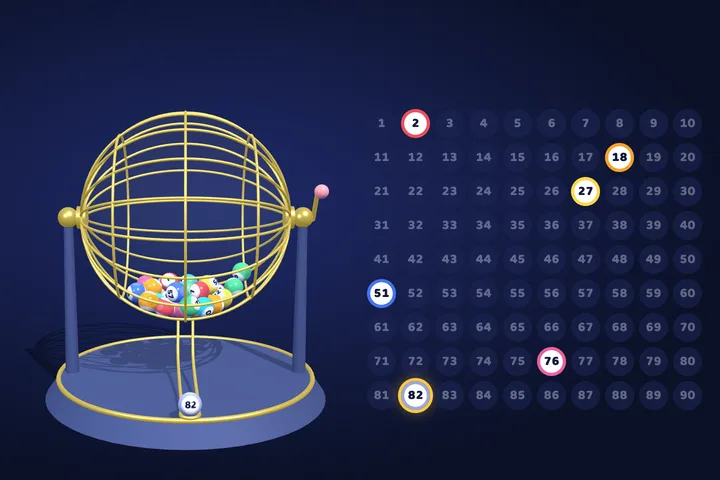
This bingo has everything you need to play with your class. Project the bingo caller on the board: when you draw a ball, the cage spins a few times, the ball rolls down the ramp and the view zooms in on the number while a voice calls it. The board below shows every number called, so you can check a card when someone shouts bingo. The Cards tab makes printable bingo cards, all different.
How to use it
- Choose the bingo type: 75 numbers (the B-I-N-G-O 5 × 5 card) or 90 numbers (the 3-row card).
- In Cards, choose how many you need and tap Print or save as PDF. Hand out one per child.
- In Caller, tap Draw a ball or tap the cage. If you are projecting, use Fullscreen.
- When someone shouts bingo, check their card against the board of called numbers.
Ideas for the classroom
- Recognize numbers and hear how they are said, from 1 to 90.
- Practice tens and ones with the 90-ball card, where each column is a group of ten.
- An end-of-term or special-day bingo with the whole class.
- Work on attention and listening: mark only what you hear.
It works on a computer, a tablet and a phone, with nothing to install. It needs an Amigoki account, which you create with Google or with your email. The game is saved in your browser: if the page reloads, the called numbers are still there.
Frequently asked questions
Do I need an account?
Yes. This tool works with an Amigoki account, which you create with Google or with your email. Use the same account for bingo, number cards and printable dominoes.
What is the difference between 75-ball and 90-ball bingo?
The 75-ball game uses 5 × 5 cards with B-I-N-G-O across the top and a free center square. The 90-ball game uses cards with 3 rows and 9 columns holding 15 numbers: each column is a group of ten (1 to 9, 10 to 19… up to 90) and each row has 5 numbers. Choose the one played where you live.
Are the numbers really random?
Yes. Each ball is chosen with the browser’s random number generator from the ones left, and a number never comes up twice in the same game.
How many bingo cards can I print?
Up to 60 at a time, all different. If you need more, tap Make new cards and print another batch.
Can I play without the voice?
Yes. Untick Call the number out loud, or turn the sound off with the button at the top right. The number still shows on screen and on the board.